
[FREE] PostgreSQL ALTER TABLE Lock: How Lock Cascaded Outage
Here’s the PostgreSQL locking behavior that caused it and the safe DDL pattern that prevents it.

The migration ran fine in staging. It took production down in 2 minutes and kept it down for hours.
Table of Contents
Setup
What Actually Happened
The Root Cause: ACCESS EXCLUSIVE Lock
The Lock Queue Cascade
RCA Timeline
The Right Way to Do It
What Changed After This Incident
📨 If this was useful, share it with one engineer on your team who manages production databases.
The Sev-1 Database is a reader-supported publication FREE and Premium 8$/month. Each week I share practical takeaways from real incidents no theory, just what actually breaks and how to fix it.
This one still bothers me.
Not because it was exotic. Not because some obscure PostgreSQL behavior was to blame. It bothers me because it was entirely preventable, and because I’ve seen the same pattern at three different companies in the past two years.
Here’s what happened.

Setup: PostgreSQL 14, 180M Row Table
PostgreSQL 14. Primary table approximately 180 million rows, 320 GB. The table had been growing for four years without a schema change.
A new feature required adding a column with a NOT NULL constraint and a default value. Engineer had done this before dozens of times on smaller tables with no issues.
Not using the exact table, but giving different name: orders
Plan:
Deploy application code (backward compatible)
Run migration:
ALTER TABLE orders ADD COLUMN status_v2 TEXT NOT NULL DEFAULT 'pending'Deploy second app version using the new column
Step 2 was the problem.
What Actually Happened: How PostgreSQL ACCESS EXCLUSIVE Lock Cascaded to Full Outage
At 9:07 AM, the migration was executed in production.
The API was returning 503s. Connection timeouts across all services. The primary database was at 100% CPU. The connection pool was exhausted.
The migration appeared to be running visible in pg_stat_activity. But every other query was behind it in a lock queue.
Root Cause
PostgreSQL ALTER TABLE NOT NULL Validation and ACCESS EXCLUSIVE Lock
ALTER TABLE ... ADD COLUMN acquires an ACCESS EXCLUSIVE lock the most restrictive PostgreSQL lock, which blocks every other operation on the table for its duration.
In PostgreSQL 11+, adding a column with a non-volatile default no longer rewrites the table the default is stored in catalog metadata. This made the migration appear safe.
But two conditions break this optimization:
The default is a volatile function (
now(),random())The
NOT NULLcombined with a DEFAULT forces a full table scan to validate existing rows
Condition 2 applied here. PostgreSQL needed to verify all 180 million rows would satisfy NOT NULL with the new default. That required a full table scan while holding ACCESS EXCLUSIVE the entire time.
More details on Lock Mechanism
How PostgreSQL Lock Queue Cascade Exhausts the Connection Pool in Under 2 Minutes
The orders table received approximately high amount of queries per second during peak hours. When ACCESS EXCLUSIVE was acquired at 9:07 AM, every subsequent query queued behind it each one holding an open connection from the pool.
Within 90 seconds, the connection pool was exhausted. New requests couldn’t acquire a connection. 503s started.
Migration itself took 47 minutes to complete. The service was dead within 2 minutes.
🚀 PostgreSQL Health Report — One SQL file. 60+ diagnostic checks. Detects vacuum lag, bloat, lock chains, replication slot danger, and more. Used by DBAs managing production at scale.
Full RCA: PostgreSQL ALTER TABLE Outage from Lock to Recovery
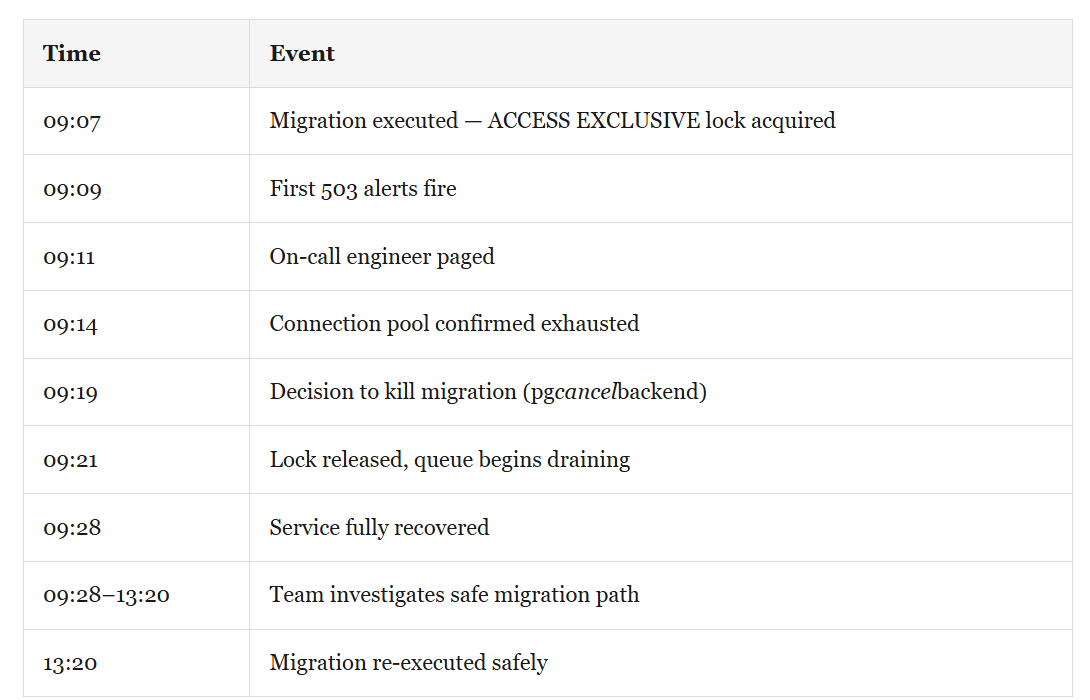
Total customer-facing impact: ~19 minutes hard downtime, hours delayed deployment.
How to Safely Add a NOT NULL Column to a Large PostgreSQL Table Without Downtime
Safe pattern for adding a NOT NULL column with a default to a large table:
Step 1: Add the column as nullable first
-- Fast — no table rewrite, no validation scan
ALTER TABLE orders ADD COLUMN status_v2 TEXT DEFAULT 'pending';

--Even though it's fast, this still takes an ACCESS EXCLUSIVE lock. On a busy table, use a SET lock_timeout = '2s'; before running to ensure you don't queue up behind long-running queries and block the whole app.
Step 2: Backfill existing rows in batches
-- Create a partial index to make the scan extremely fast
CREATE INDEX CONCURRENTLY IF NOT EXISTS idx_orders_status_v2_null
ON orders (id) WHERE status_v2 IS NULL;

DO $$
DECLARE
    rows_updated INT;
BEGIN
    LOOP
        WITH batch AS (
            SELECT id FROM orders
            WHERE status_v2 IS NULL
            LIMIT 5000
            FOR UPDATE SKIP LOCKED
        )
        UPDATE orders SET status_v2 = 'pending'
        FROM batch WHERE orders.id = batch.id;

        GET DIAGNOSTICS rows_updated = ROW_COUNT;
        EXIT WHEN rows_updated = 0;

        COMMIT; -- Releases locks and allows VACUUM to clean up bloat
        PERFORM pg_sleep(0.1);
    END LOOP;
END $$;

--Drop the partial index after the backfill completes.
--DROP INDEX CONCURRENTLY idx_orders_status_v2_null;
Step 3: Add NOT NULL constraint using NOT VALID, then validate separately
-- Phase 1: add without validating existing rows (fast, brief lock)
ALTER TABLE orders ADD CONSTRAINT orders_status_v2_nn
    CHECK (status_v2 IS NOT NULL) NOT VALID;

-- Phase 2: validate (uses ShareUpdateExclusiveLock — doesn't block reads/writes)
ALTER TABLE orders VALIDATE CONSTRAINT orders_status_v2_nn;
Always run a VACUUM ANALYZE orders; after a massive backfill to ensure the query planner has fresh statistics on the new column distribution.
What Changed: Schema Migration Process After This PostgreSQL Locking Incident
All migrations against tables over 10M rows now require DBA review
A pre-migration checklist was created that explicitly asks: Does this acquire ACCESS EXCLUSIVE? For how long?
📧 Want the complete PostgreSQL Health Report?
Includes MultiXact checks, vacuum monitoring, checkpoint diagnostics, WAL slot health, and 60+ diagnostic queries all in one SQL file.
📌 Upgrade to Premium ($8/month) — Premium subscribers get the full SQL diagnostic packs, step-by-step playbooks, and the queries I actually run during a Sev-1.