
[Premium] How Misunderstood Lock Modes Cause CPU Spikes
8 Lock Modes, 3 Sev-1 Patterns, and the Diagnostic SQL Pack to Fix Them
PostgreSQL Explicit Locking: Sev-1 Playbook You’re Missing
Table of Contents
Scene: We Just Ran an ALTER TABLE
8 Table-Level Lock Modes (What Actually Conflicts With What)
Sev-1 Patterns I’ve Seen (Over and Over)
Row-Level Locks Where Deadlocks Live
Advisory Locks Hidden Sev-1 Landmine
CPU Connection Why Locking Issues Look Like CPU Problems
Locking Parameters That Matter
Complete Diagnostic SQL Pack (7 Queries)
Recovery Runbook (When You’re in the Sev-1)
Prevention Engineering Checklist
Scene: We Just Ran an ALTER TABLE
Tuesday, 2:14 PM Production
A developer opens a pull request: Add a NOT NULL column with a default value to the orders table. The migration runs:
ALTER TABLE orders ADD COLUMN priority integer NOT NULL DEFAULT 0;Within 8 seconds:
CRITICAL: Connection pool exhausted connections in use
CRITICAL: API response time > 12 seconds
CRITICAL: CPU utilization 94%
WARNING: pg_stat_activity shows sessions in Lock wait event
The ALTER TABLE acquired an ACCESS EXCLUSIVE lock on the orders table.
Every SELECT, INSERT, and UPDATE targeting that table is now queued. The queue grows. Backend processes spin, context-switching drives CPU to 94%. The application pool drains. Customers see errors.
Root cause: One DDL statement the developer assumed was instant.
Even when PostgreSQL optimizes away the table rewrite (PG 11+), the ACCESS EXCLUSIVE lock is still required, so the outage risk remains.
Why This Keeps Happening
In every Sev-1 I’ve worked involving locking, the root cause was the same: the team did not know which lock mode their statement acquired, and did not know what it would block.
This article gives you the full map.
If you find this useful, subscribe so you don’t miss the next playbook:
Part 1: The 8 Table-Level Lock Modes
PostgreSQL has 8 table-level lock modes. Every SQL command implicitly acquires one of them. The names are historical and misleading even ROW EXCLUSIVE is a table-level lock. The only difference between modes is which other modes they conflict with.
The Lock Modes (Least → Most Restrictive)
ACCESS SHARE (AccessShareLock)
Conflicts with the ACCESS EXCLUSIVE lock mode only.
The SELECT command acquires a lock of this mode on referenced tables. In general, any query that only reads a table and does not modify it will acquire this lock mode.ROW SHARE (RowShareLock)
Conflicts with the EXCLUSIVE and ACCESS EXCLUSIVE lock modes.
The SELECT command acquires a lock of this mode on all tables on which one of the FOR UPDATE, FOR NO KEY UPDATE, FOR SHARE, or FOR KEY SHARE options is specified (in addition to ACCESS SHARE locks on any other tables that are referenced without any explicit FOR ... locking option).ROW EXCLUSIVE (RowExclusiveLock)
Conflicts with the SHARE, SHARE ROW EXCLUSIVE, EXCLUSIVE, and ACCESS EX CLUSIVE lock modes.
The commands UPDATE, DELETE, INSERT, and MERGE acquire this lock mode on the target table (in addition to ACCESS SHARE locks on any other referenced tables). In general, this lock mode will be acquired by any command that modifies data in a table.SHARE UPDATE EXCLUSIVE (ShareUpdateExclusiveLock)
Conflicts with the SHARE UPDATE EXCLUSIVE, SHARE, SHARE ROW EXCLUSIVE, EX CLUSIVE, and ACCESS EXCLUSIVE lock modes.
This mode protects a table against concur rent schema changes and VACUUM runs. Acquired by VACUUM (without FULL), ANALYZE, CREATE INDEX CONCURRENTLY, CRE ATE STATISTICS, COMMENT ON, REINDEX CONCURRENTLY, and certain ALTER INDEX and ALTER TABLE variants (for full details see the documentation of these commands).SHARE (ShareLock)
Conflicts with the ROW EXCLUSIVE, SHARE UPDATE EXCLUSIVE, SHARE ROW EX CLUSIVE, EXCLUSIVE, and ACCESS EXCLUSIVE lock modes.
This mode protects a table against concurrent data changes. Acquired by CREATE INDEX (without CONCURRENTLY).SHARE ROW EXCLUSIVE (ShareRowExclusiveLock)
Conflicts with the ROW EXCLUSIVE, SHARE UPDATE EXCLUSIVE, SHARE, SHARE ROW EXCLUSIVE, EXCLUSIVE, and ACCESS EXCLUSIVE lock modes.
This mode protects a table against concurrent data changes, and is self-exclusive so that only one session can hold it at a time Acquired by CREATE TRIGGER and some forms of ALTER TABLE.EXCLUSIVE (ExclusiveLock)
Conflicts with the ROW SHARE, ROW EXCLUSIVE, SHARE UPDATE EXCLUSIVE, SHARE, SHARE ROW EXCLUSIVE, EXCLUSIVE, and ACCESS EXCLUSIVE lock modes.
This mode allows only concurrent ACCESS SHARE locks, i.e., only reads from the table can proceed in parallel with a transaction holding this lock mode. Acquired by REFRESH MATERIALIZED VIEW CONCURRENTLY.ACCESS EXCLUSIVE (AccessExclusiveLock)
Conflicts with locks of all modes (ACCESS SHARE, ROW SHARE, ROW EXCLUSIVE, SHARE UPDATE EXCLUSIVE, SHARE, SHARE ROW EXCLUSIVE, EXCLUSIVE, and ACCESS EX CLUSIVE).
This mode guarantees that the holder is the only transaction accessing the table in any way. Acquired by the DROP TABLE, TRUNCATE, REINDEX, CLUSTER, VACUUM FULL, and RE FRESH MATERIALIZED VIEW (without CONCURRENTLY) commands.
Many forms of ALTER INDEX and ALTER TABLE also acquire a lock at this level. This is also the default lock mode for LOCK TABLE statements that do not specify a mode explicitly.
Tip
Only an ACCESS EXCLUSIVE lock blocks a SELECT (without FOR UPDATE/SHARE) statement
Full Conflict Matrix
Read this as: “If the row lock is already held, can the column lock be acquired?”
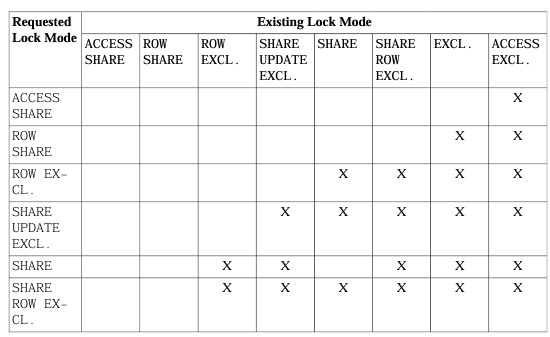
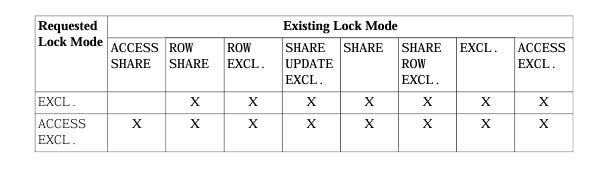
One Rule to Memorize
ACCESS EXCLUSIVE blocks everything. Even SELECTs. Any command that acquires it will queue every other session touching that table.
Commands that acquire it:
DROP TABLE, TRUNCATE, VACUUM FULL, REINDEX, CLUSTER, REFRESH MATERIALIZED VIEW, most ALTER TABLE, and LOCK TABLE (default mode).
Part 2: The Sev-1 Patterns I’ve Seen (Over and Over)
Pattern 1: Quick ALTER TABLE That Queues the World
What happens:
1. Developer runs ALTER TABLE big_table ADD COLUMN during business hours.
2. ALTER TABLE requests ACCESS EXCLUSIVE lock.
3. There’s a long-running SELECT already holding ACCESS SHARE.
4. ALTER TABLE waits for that SELECT to finish.
5. While ALTER TABLE waits, every new query also queues behind it because the pending ACCESS EXCLUSIVE blocks them.
Timeline:

  Session A:  SELECT * FROM big_table WHERE ...   [ACCESS SHARE — running 45s]
  Session B:  ALTER TABLE big_table ADD COLUMN ... [ACCESS EXCLUSIVE — WAITING for A]
  Session C:  SELECT id FROM big_table ...         [ACCESS SHARE — BLOCKED by B’s pending lock]
  Session D:  INSERT INTO big_table ...            [ROW EXCLUSIVE — BLOCKED by B’s pending lock]
  Session E:  UPDATE big_table SET ...             [ROW EXCLUSIVE — BLOCKED by B’s pending lock]

  ...
Session N: Connection pool exhausted. Application down.Trap: Even though ACCESS SHARE locks are compatible with each other, the pending ACCESS EXCLUSIVE lock creates a barrier. PostgreSQL’s lock queue is FIFO-fair new compatible locks cannot skip ahead of a waiting exclusive lock.
Diagnostic query find the pending ACCESS EXCLUSIVE:
SELECT
    l.pid,
    l.locktype,
    l.relation::regclass AS table_name,
    l.mode,
    l.granted,
    a.state,
    a.query,
    a.wait_event_type,
    a.wait_event,
    age(now(), a.query_start) AS duration
FROM pg_locks l
JOIN pg_stat_activity a ON a.pid = l.pid
WHERE l.locktype = 'relation'
  AND l.relation IS NOT NULL
ORDER BY l.granted, a.query_start;
Fix:
-- Set a lock timeout BEFORE the ALTER TABLE
SET lock_timeout = '3s';

ALTER TABLE big_table ADD COLUMN priority integer NOT NULL DEFAULT 0;
-- If the lock can’t be acquired in 3s, the ALTER fails instead of queuing the world.
Pattern 2: VACUUM FULL During Peak Hours → CPU Spike
What happens:
1. A team member runs VACUUM FULL on a large table to reclaim disk space.
2. VACUUM FULL acquires ACCESS EXCLUSIVE blocks all reads and writes.
3. All sessions pile up. CPU climbs due to context-switching across hundreds of waiting backends.
4. Connection pool saturates. Application layer starts retrying. CPU hits 95%+.
Why CPU spikes from locking:
- Each blocked backend is a PostgreSQL process consuming memory and a slot.
- The OS scheduler context-switches between all these waiting processes.
- Application retry logic creates even more connections, amplifying the load.
- When the lock is finally released, all queued queries fire simultaneously — a thundering herd.
Diagnostic confirm VACUUM FULL is the blocker:
SELECT pid, state, wait_event_type, wait_event, query,
       age(now(), query_start) AS running_for
FROM pg_stat_activity
WHERE query ILIKE '%vacuum%full%'
OR wait_event = 'relation'
ORDER BY query_start;
Prevention:
- Never run VACUUM FULL during business hours. Use regular VACUUM (SHARE UPDATE EXCLUSIVE doesn’t block reads or writes).
- If you need to reclaim space, use pg_repack extension which works without ACCESS EXCLUSIVE.
- Schedule maintenance during low-traffic windows.
Pattern 3: CREATE INDEX Without CONCURRENTLY → Writes Blocked
What happens:
1. CREATE INDEX acquires a SHARE lock.
2. SHARE conflicts with ROW EXCLUSIVE (which is what INSERT, UPDATE, DELETE use).
3. All writes to the table are blocked until the index build completes.
4. On a large table, this can take minutes.
-- WRONG: Blocks all writes for the duration of the index build
CREATE INDEX idx_orders_customer ON orders(customer_id);

-- RIGHT: Allows concurrent reads AND writes
CREATE INDEX CONCURRENTLY idx_orders_customer ON orders(customer_id);
Difference:
| Command | Lock Acquired | Blocks Writes? | Blocks Reads? |
|---------|--------------|----------------|---------------|
| CREATE INDEX | SHARE | Yes | No |
| CREATE INDEX CONCURRENTLY | SHARE UPDATE EXCLUSIVE | No | No |
What you get below:
- Deadlock reproduction scripts you can run today
- Advisory lock traps that cause silent Sev-1s
- The CPU ↔ Locking causal chain (why your CPU dashboard is lying to you)
- 7-query diagnostic SQL pack (copy-paste into any Sev-1)
- Azure Flexible Server parameter configuration
- Recovery runbook (4 steps, 60 seconds to root cause)
- Prevention engineering checklist
Upgrade to Paid $8/month