
PostgreSQL JSON vs JSONB: Missing GIN Index Detection in Sev-1
Discover the real difference between PostgreSQL JSON and JSONB. Learn how indexing, TOAST, and write amplification impact performance and run free SQL query to instantly detect missing indexes

If you ask a PostgreSQL developer which data type to use for semi-structured data, the default answer is almost always:
Use JSONB.
While this is correct 95% of the time, treating JSONB as a magic bullet without understanding its internals can lead to massive performance bottlenecks, especially around write amplification, TOAST bloat, and JSONB storage overhead.
This guide goes beyond the common PostgreSQL JSON vs JSONB: text vs binary explanation and breaks down how PostgreSQL actually stores JSON and JSONB on disk, how indexing works, and when JSON might surprisingly outperform JSONB.
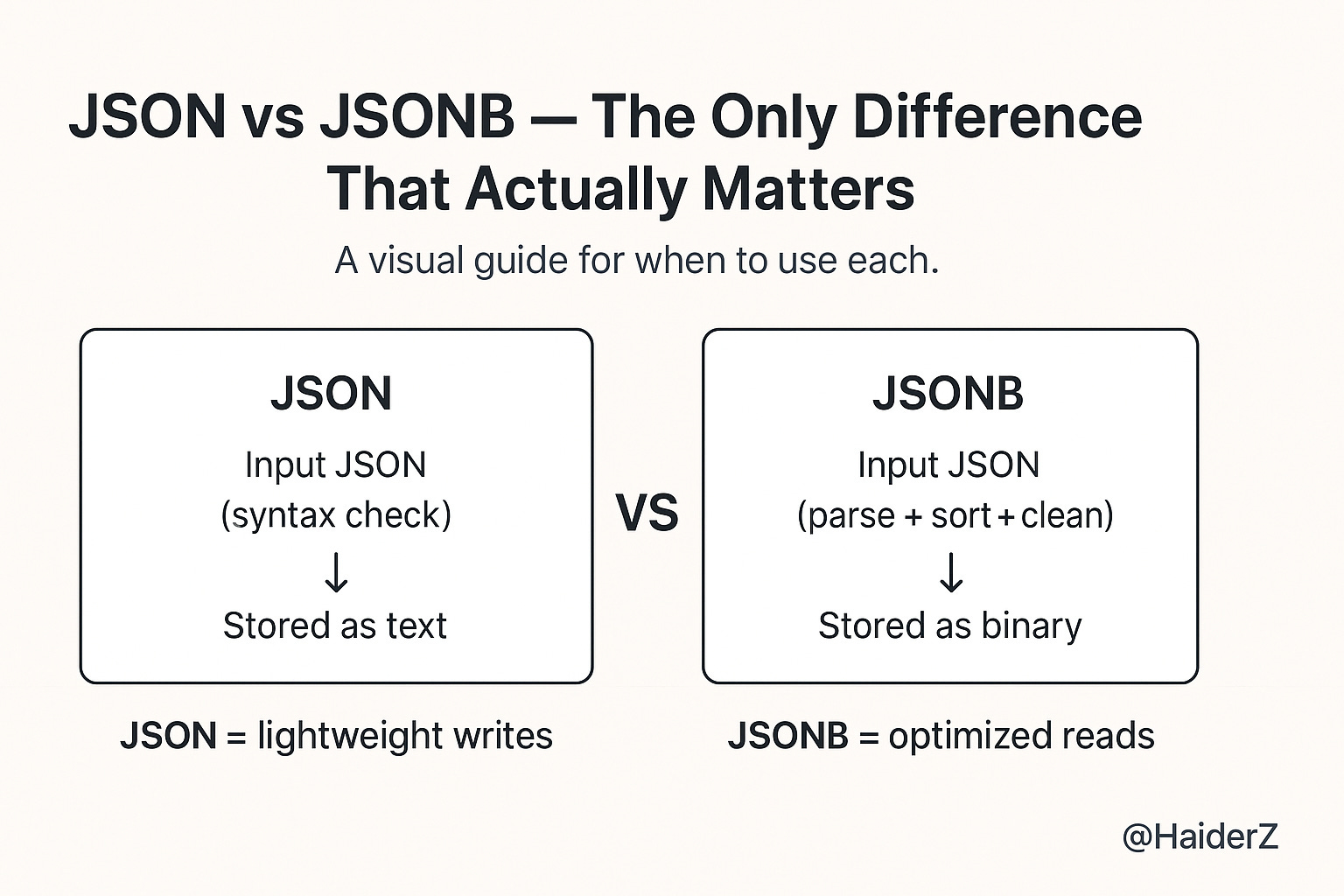
The Core Distinction: Input Text vs Decomposed Binary
The fundamental difference between PostgreSQL JSON vs JSONB is not just query speed; it’s how PostgreSQL persists each type internally.
JSON (The Log Store)
PostgreSQL validates the syntax but stores JSON exactly as text:
Whitespace preserved
Key ordering preserved
Duplicate keys preserved
Stored almost like TEXT with a JSON syntax check
This makes JSON very efficient for write-heavy workloads, bulk ingestion, logs, and cases where you don’t query inside the JSON structure.
JSONB (The Document Store)
The B stands for Binary. On input, PostgreSQL:
Parses the JSON
Removes whitespace
Removes duplicate keys (keeps the last one)
Sorts keys for faster lookup
Converts it into a binary tree-like internal structure
This transformation has a CPU cost on write, but it makes JSONB ideal for:
Fast reads
JSONB indexing
Containment queries (@>)
Querying JSON attributes frequently
This is why JSONB dominates in analytical and query-heavy workloads.
The Hidden Cost of JSONB: Write Amplification & TOAST
This is one of the most critical performance considerations and the #1 thing missing from entry-level PostgreSQL JSON vs JSONB difference articles.
How JSONB Updates Work Under the Hood
PostgreSQL cannot perform partial updates for JSONB at the storage level.
Even if you run:
jsonb_set(data, '{profile,active}', 'true')PostgreSQL must:
Read the entire JSONB document
Modify it in memory
Write a new full copy of the document (MVCC rules)
If the JSONB document is 5MB, the database rewrites all 5MB even if you changed a single Boolean value.
This causes:
High WAL generation
Table bloat
TOAST table churn
Slower updates under write load
The Impact on Table Bloat
If your JSONB documents are large (exceeding the 2KB page limit), they are moved to TOAST storage (The Oversized-Attribute Storage Technique).
Frequent updates to a single key in a large JSONB document will cause massive churn in your TOAST tables and generate significant WAL (Write Ahead Log) traffic.
Takeaway: If you have a large document with a frequently updating counter, do not store it inside the JSONB blob. Move high-velocity attributes to standard columns.
Example:
Bad for me
{"views": 1000000, "country": "UAE", "device": "mobile"}Better
Store
viewsin a normal integer columnKeep stable fields in a JSONB column
This is the difference between accidental bloat and production-grade performance.
Advanced Indexing Strategies for JSONB
A standard GIN index is powerful, but it’s heavy. You can optimize it significantly.
Most developers default to:
CREATE INDEX idx_data ON users USING GIN (data);But this JSONB GIN index is heavy, slow to build, and consumes a lot of disk space.
Here are the optimized options.
1. The Default GIN Index (jsonb_ops)
CREATE INDEX idx_data ON users USING GIN (data);Indexes every key and value
Supports all operators (
@>,?,?|,?&)Large size (can exceed the table size!)
It is flexible but occupies significant disk space.
Use it only when you truly need full GIN coverage.
2. Optimized GIN Index (jsonb_path_ops)
This is the best index for containment queries (@>).
CREATE INDEX idx_data_path ON users USING GIN (data jsonb_path_ops);This creates a hash of the path to the value.
Advantages:
It is smaller and faster than the default index
Faster to build
Faster for lookups
Perfect for find all records where X contains Y
Best for JSONB performance in most apps
Limitation:
Only supports
@>(containment), not every operator
For 80% of real-world use cases, this is the right choice.
🆓 Free Download: JSONB Index Health Check
If you use JSONB in PostgreSQL, you might be scanning entire tables without knowing it.
👉 Get the free JSONB missing index detector → TheSev1DatabaseGuy/postgres-sev1-toolkit-samples
This single SQL query checks all your JSONB columns for missing GIN indexes and generates the exact
CREATE INDEXcommand to fix them.
3. B-Tree Index for a Single Key
If you only query one specific field, indexing the entire JSONB is wasteful.
Example: searching by user ID inside JSONB.
Efficient solution:
CREATE INDEX idx_user_uuid ON users ((data->>'uuid'));This is:
Smaller
Faster
More selective
Better for filtering
Performance Benchmarks: When JSON Actually Wins
Although JSONB dominates read-heavy workloads, plain JSON wins in a very specific scenario:
High-throughput ingestion logs
Why JSON wins:
No parsing into binary → faster writes
Lower CPU cost
Best for write once, rarely query data
Example use cases:
Incoming webhooks
Audit logs
Archival data
Event firehose ingestion
Raw API payload storage
If you only retrieve documents by primary key and never search inside them, JSON is faster and cheaper.
Architectural Decision Matrix
1. Storage Format
JSON: Raw Text (stores exactly what was sent)
JSONB: Decomposed Binary (parsed and structured)
2. Whitespace & Ordering
JSON: Preserved (keeps all spaces and key order)
JSONB: Discarded & Sorted (removes whitespace, reorders keys for efficiency)
3. Indexing Capabilities
JSON: Not supported (mostly requires functional indexes)
JSONB: Full Support (GIN, B-Tree, Hash)
4. Write Performance
JSON: Fast (No parsing overhead)
JSONB: Slower (Requires parsing and conversion)
5. Read Performance
JSON: Slow (Must re-parse text on every query)
JSONB: Fast (Binary format allows seeking)
6. Best Use Cases
JSON: Audit logs, incoming webhooks, archival data
JSONB: User profiles, configuration objects, analytics data
Summary
Stop asking Which is better: JSON or JSONB?
Instead ask: How will this data be accessed?
Use JSONB for:
Querying inside documents
Using GIN indexes
Fast reads
Application user profiles
Dynamic configuration
Analytics workloads
Operational data where you need to query specific keys.
Use JSON for:
Write-heavy pipelines
Audit logs
Webhook ingestion
Raw JSON storage
Data you never query inside
Optimize JSONB performance:
Prefer
jsonb_path_opsfor smaller, faster GIN indexesAvoid placing frequently updated counters inside large JSONB blobs
Use extracted indexes for single keys
If you follow these practices, you’ll avoid JSONB write amplification, reduce TOAST bloat, and keep your PostgreSQL application fast and predictable.
Super practical breakdown! The TOAST churn point is especially valuable since most guides skip over write amplification entirely. We hit this exact issue last year when storing user activity counters in large JSONB docs and the WAL bloat was brutal. Moving high-velocity fields to standar columns cut our write load by nearly 60%. What I'd add is that jsonb_path_ops also falls down hard when you need existence checks on keys that aren't in containment queries, so there's definitely a tradeoff.