
[Premium] The systemd Setting That Silently Breaks PostgreSQL Parallel Queries
The official documentation explains exactly why you're seeing "could not remove shared memory segment" warnings. Here's what it says and how to fix it.

Table of Contents
Warning That Appears Out of Nowhere
When It Could Escalate to Sev-1
What the Manual Says: The Root Cause
RemoveIPC Setting
Why This Causes Random Failures
When It Happens
Common Triggers
Impact on PostgreSQL
Parallel Query Failures
Inconsistent Behavior
Potential Server Instability
How to Diagnose the Problem
Step 1: Check if postgres is a System User
Step 2: Check RemoveIPC Setting
Step 3: Correlate Warnings with Sessions
Two Fixes from the Manual
Fix 1: Make postgres a System User (Preferred)
Fix 2: Disable RemoveIPC
Why Package Installations Usually Work
When You Hit This Issue
Quick Verification After Fix
Prevention Checklist
The Key Takeaways
References
🚀 Get the PostgreSQL Health Report: a single SQL function that runs 60+ diagnostic checks including TXID wraparound detection, autovacuum health, and ready-to-run fixes..
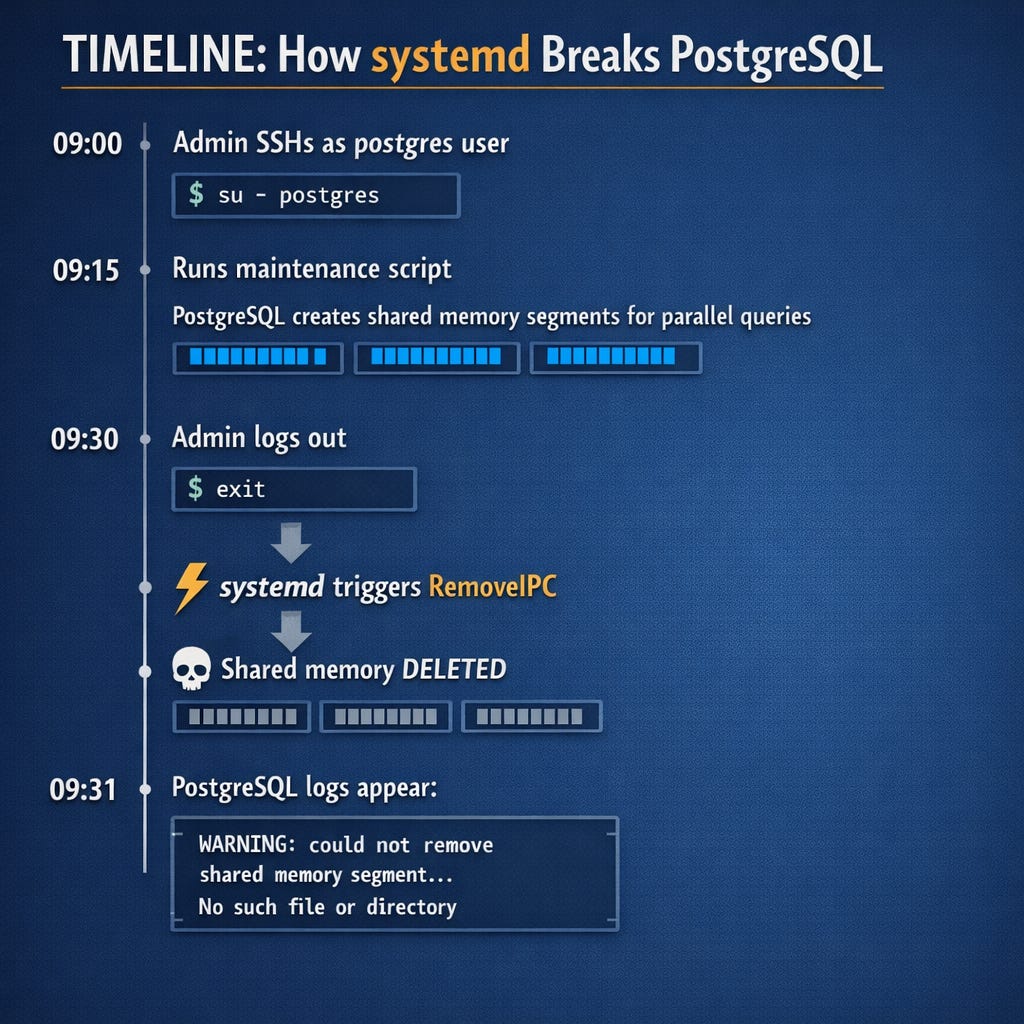
Warning That Appears Out of Nowhere
You’re reviewing your PostgreSQL logs and find this scattered throughout:
WARNING: could not remove shared memory segment
PostgreSQL.1450751626”: No such file or directory
The database seems to be running. Queries complete. But this warning keeps appearing sometimes during parallel queries, sometimes during routine operations.
You check disk space. Plenty available.
You check memory. Nothing unusual.
You restart PostgreSQL. The warnings come back.
This is a Sev-3/Sev-2 issue that should be fixed proactively before it combines with other factors to cause a real Sev-1.
When It could Escalate to Sev-1
Scenario 1: Critical Parallel Queries Fail
If your application depends on parallel queries for time-sensitive operations
Queries fail or return incomplete results
Business-critical processes break
Scenario 2: Combined with Other Issues
RemoveIPC + high connection count + memory pressure
The unreliable behavior becomes the tipping point
What’s happening?
The PostgreSQL manual has the answer, and it points to an unlikely culprit: systemd.
What the Manual Says: The Root Cause
Deep in Chapter 19 ”Server Setup and Operation”there’s a section called “systemd RemoveIPC” with this warning:
If systemd is in use, some care must be taken that IPC resources (including shared memory) are not prematurely removed by the operating system.
Translation: systemd can delete PostgreSQL’s shared memory segments while the database is still running.
RemoveIPC Setting
The manual explains the mechanism:
The setting RemoveIPC in logind.conf controls whether IPC objects are removed when a user fully logs out. System users are exempt. This setting defaults to on in stock systemd, but some operating system distributions default it to off.
Here’s what that means:
RemoveIPC=yes (default)→ When a user logs out, systemd removes all their IPC resources (shared memory, semaphores)
RemoveIPC=no → IPC resources persist after logout
System users → Exempt from RemoveIPC regardless of setting
As per manual:
Alternatively, if the user account was created incorrectly or cannot be changed, it is recommended to set RemoveIPC=no in /etc/systemd/logind.conf or another appropriate configuration file.
Problem
If the postgres user is not a system user, systemd treats it like a regular user. Every time an admin session ends SSH disconnect, maintenance script completion, cron job finish systemd may decide to clean up the postgres user’s IPC resources.
Including shared memory segments that PostgreSQL is actively using.
Why This Causes Random Failures
The manual describes the exact symptom:
A typical observed effect when this setting is on is that shared memory objects used for parallel query execution are removed at apparently random times, leading to errors and warnings while attempting to open and remove them.
The example warning:
WARNING: could not remove shared memory segment
PostgreSQL.1450751626”: No such file or directory
When It Happens
A user logging out might happen as part of a maintenance job or manually when an administrator logs in as the postgres user or something similar, so it is hard to prevent in general.
Common triggers:
→ SSH session as postgres ends: User logged out
→ su - postgres session ends: User session terminated
→ Cron job running as postgres completes: Background session ended
→ Maintenance script finishes: User session closed
→ Ansible/automation task completes: Remote session terminated
The randomness is maddening. It’s not predictable because it depends on when systemd decides the user has “fully logged out.”
The Impact on PostgreSQL
1. Parallel Query Failures
Parallel queries create shared memory segments for worker communication. When systemd removes mid-query:
WARNING: could not remove shared memory segment
PostgreSQL.1450751626”: No such file or directory
The query may still complete, but resources aren’t properly cleaned up.
2. Inconsistent Behavior
The manual notes:
Different types of IPC objects (shared memory vs. semaphores, System V vs. POSIX) are treated slightly differently by systemd, so one might observe that some IPC resources are not removed in the same way as others.
This means you might see:
- Parallel queries fail intermittently
- Some operations work, others don’t
- Errors that appear and disappear without pattern
3. Potential Server Instability
The manual’s warning is stark:
At least one of these two things has to be ensured, or the PostgreSQL server will be very unreliable.
Very unreliable. That’s the official documentation telling you this isn’t a minor issue.
Keep reading with a 7-day free trial
Subscribe to The Sev-1 Database to keep reading this post and get 7 days of free access to the full post archives.