
[Premium] PostgreSQL Memory Architecture: Why work_mem Multiplies and Causes OOM
The official documentation tells you exactly why your database runs out of memory.

Incident: When Math Becomes Your Enemy
A running PostgreSQL 15 on a 64GB server hits a Sev-1. The Linux OOM killer terminates the postmaster. All connections drop. Crash recovery begins.
Database Engineer checks the configuration:
shared_buffers = 16GB
work_mem = 256MB
max_connections = 200
max_parallel_workers_per_gather = 4
256MB work_mem seems reasonable, think. It’s only 0.4% of RAM. But let’s do the math the PostgreSQL manual forces us to do:
One complex query:
- 3 hash joins × work_mem (256MB) = 768MB
- 2 sorts × work_mem (256MB) = 512MB
- × 5 parallel workers (leader + 4) = 6.4GB
Just ONE query = 6.4GB
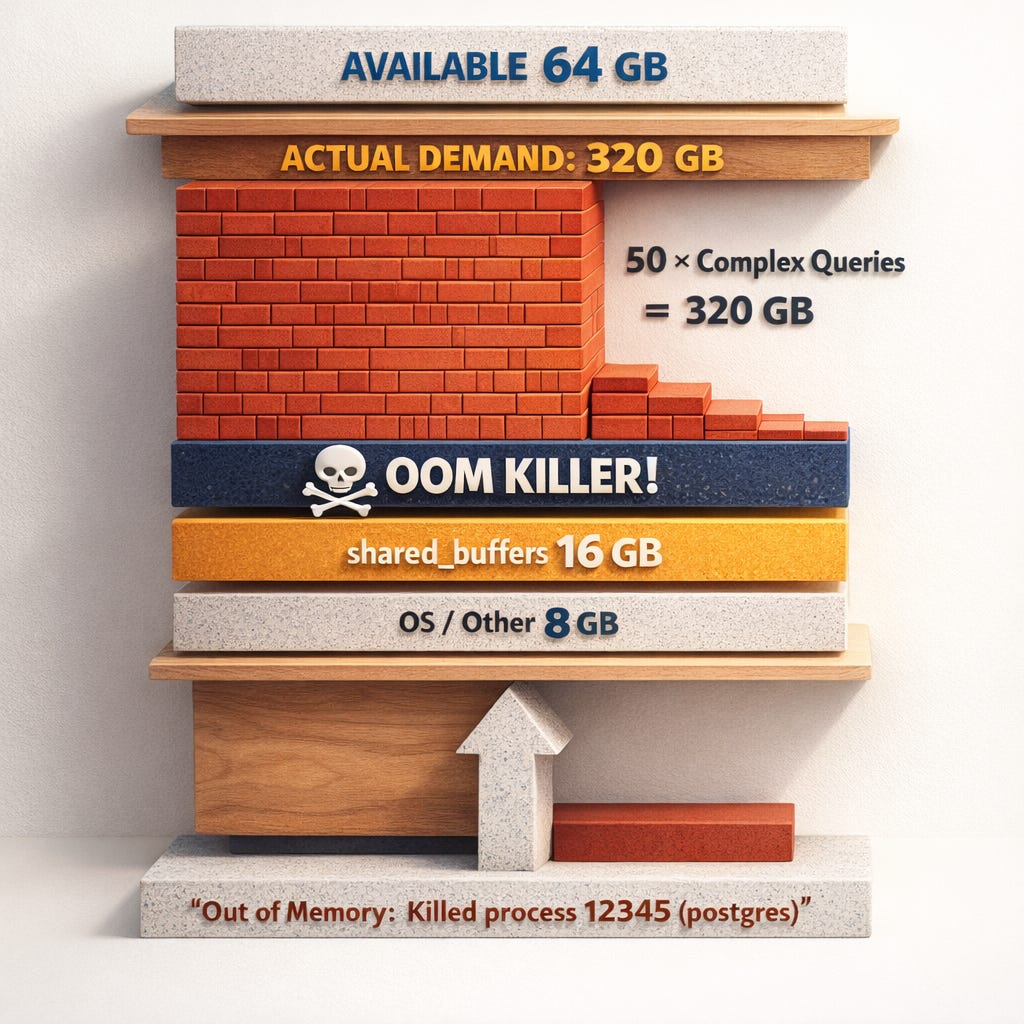
Now multiply by 50 concurrent analytical queries. 320GB of memory demand on a 64GB server.
Lets go more deeper.
Table of Contents
Incident: When Math Becomes Your Enemy
How PostgreSQL Uses Memory (Manual View)
work_mem and OOM – What the Manual Actually Says
Complete Parameter Reference for OOM Prevention
OS-Level OOM and Kernel Settings
Diagnostic Queries
1. Current Memory Configuration: audit all OOM-relevant parameters
2. Theoretical Maximum Memory calculate peak RAM demand with danger ratios
3. Active Queries by Memory Risk find memory-heavy queries right now
4. Connection Count by State identify idle connection waste
5. Maintenance Operations detect concurrent VACUUM/REINDEX memory
6. Calculate Safe work_mem compute conservative limits for your server
Manual-Backed Mitigation Strategy
The 3 Things to Remember
Monitor Query
Summary
References
🚀 Get the PostgreSQL Health Report: a single SQL function that runs 60+ diagnostic checks including TXID wraparound detection, autovacuum health, and ready-to-run fixes..
How PostgreSQL Uses Memory (Manual View)
Before talking parameters, we need the architectural view the manual gives.
Process Model → Many Processes = Many Memory Consumers
Chapter 3 – The PostgreSQL Server, section Server Processes explains that PostgreSQL uses a process-per-connection model:
- There is a single postmaster (server/launcher) process
- Each client connection gets its own backend process
- Background processes (autovacuum workers, checkpointer, WAL writer, etc.) are separate processes
So from the manual’s perspective:
Each connection = one OS process with its own private memory, plus access to shared memory (e.g., shared_buffers).
This is the first key point for OOM:
max_connections (and background workers) directly control how many processes can allocate private memory simultaneously.
Memory Types in PostgreSQL (High Level)
The manual splits memory into two main categories:
Shared Memory – used by all processes:
- Controlled primarily by shared_buffers and other shared-memory-related parameters
Per-Process Local Memory – each backend has its own:
- Query execution (work_mem, hash_mem_multiplier) → Sorts, hashes, etc.
- Maintenance operations (maintenance_work_mem, autovacuum_work_mem) → VACUUM, CREATE INDEX
- Session-local temp buffers (temp_buffers) → Temporary tables
Critical insight: Because each backend process is independent, these parameters are not global caps; they are per-process/per-operation limits, so they multiply across connections and operations.
This multiplication is exactly where OOM comes from in real Sev-1s.
🚀 Get the PostgreSQL Health Report: a single SQL function that runs 60+ diagnostic checks including TXID wraparound detection, autovacuum health, and ready-to-run fixes..
Work_mem and OOM: What the Manual Actually Says
The Official Definition
From Section 20.4.1 – work_mem:
Specifies the amount of memory to be used by internal sort operations and hash tables before writing to temporary disk files.
Note that for a complex query, several sort or hash operations might be running in parallel; each one will be allowed to use as much as work_mem memory.
This is the important part. The manual directly says:
1. It is used per sort or hash operation
2. Complex queries may have several such operations in parallel
So the OOM risk is explicitly documented: one query can multiply work_mem several times.
Hash Operations: hash_mem_multiplier
In PostgreSQL 13+, the manual documents hash_mem_multiplier alongside work_mem:
hash_mem_multiplier controls how much additional memory can be used by hash operations beyond work_mem.
That means:
- A hash join or hash aggregate can effectively use work_mem × hash_mem_multiplier
- This can be per hash table, again multiplied by number of hash nodes and parallel workers
Default is 2.0 so hash operations can use double the work_mem you configured.
Parallel Query Multiplies Memory
Chapter 15 – Parallel Query, especially the sections explaining executor behavior, notes that:
Each parallel worker executes parts of the plan and allocates memory for its own operations.
Combine with work_mem:
If you have max_parallel_workers_per_gather = 4, a single query might run:
- 4 workers + 1 leader = 5 processes
- Each process with multiple sort/hash nodes
Effective memory usage can be roughly:
parallel_workers × memory_nodes_per_worker × work_mem × hash_mem_multiplierThe manual doesn’t give this formula explicitly, but it documents per-operation and per-worker behavior clearly.
Complete Parameter Reference for OOM Prevention
Using only what the manual documents, here are all the parameters with real OOM impact.
max_connections – The Ultimate Multiplier
The process model in Chapter 3 means:
Each connection is handled by a dedicated server process.
Every backend can:
- Allocate work_mem per sort/hash operation
- Has temp_buffers (session-local temp pages)
- May use maintenance_work_mem (for CREATE INDEX / VACUUM)
High max_connections multiplies the potential memory footprint.
shared_buffers – The Big Fixed Chunk
From Section 20.4.3:
Sets the amount of memory the database server uses for shared memory buffers.
On most modern operating systems a value of 25% of system memory is recommended as a starting point.
Key manual points:
- This memory is allocated in a single shared memory segment
- If shared_buffers is set too high relative to OS RAM, plus all backend processes, OS may start swapping or hit OOM
While shared_buffers is not per-query, it is a big fixed chunk that contributes to total PostgreSQL memory usage.
temp_buffers – Per-Session Hidden Memory
From Section 20.4.4:
Sets the maximum number of temporary buffers used by each database session.
OOM risk:
- temp_buffers is per session
- High temp_buffers × many connections (max_connections) = large possible memory reserved for temp relations
maintenance_work_mem and autovacuum_work_mem
From Section 20.4.2:
Specifies the maximum amount of memory to be used by maintenance operations such as VACUUM, CREATE INDEX, and ALTER TABLE ADD FOREIGN KEY.
From the autovacuum parameters:
Memory to be used by autovacuum workers, overriding maintenance_work_mem when set.
OOM relevance:
- maintenance_work_mem is per maintenance operation
- Autovacuum can run multiple workers in parallel (autovacuum_max_workers)
- Each worker uses its own autovacuum_work_mem
Formula for autovacuum memory ceiling:
autovacuum_max_workers × autovacuum_work_memHeavy vacuuming during load can significantly increase memory usage.
temp_file_limit – The Disk Safety Valve
From Section 20.4.6:
Specifies the maximum amount of disk space that a session can use for temporary files.
This doesn’t directly cap memory, but:
- When work_mem is exceeded, sorts/hashes spill to disk as temporary files
- Without a limit, a bad query can exhaust disk, causing cascading failures
- With temp_file_limit, you prevent one backend from consuming unbounded temp disk
The trade-off: Too-low work_mem + heavy temp file usage = severe performance problems. Too-high work_mem without temp_file_limit = both memory AND disk risk.
Parallelism Parameters
From Chapter 20 – Resource Consumption:
- max_parallel_workers_per_gather → Workers per parallel query
- max_parallel_workers → Total parallel workers system-wide
- max_parallel_maintenance_workers → Workers for parallel index builds
Each worker is essentially a backend process executing parts of the query plan.
Impact: Higher parallelism = more workers per query = more processes running sorts/hashes/aggregates using work_mem and hash_mem_multiplier.
effective_cache_size – Indirect OOM Risk
From Section 20.7:
An estimate of how much memory is available for disk caching by the operating system and within the database itself.
It does not allocate memory; it only affects the planner’s cost estimates.
This parameter:
- Doesn’t allocate memory
- But if set unrealistically high, it pushes the planner to choose plans that assume many pages are cached → chooses hash joins or complex plans that use more memory than the system can support
It’s an indirect input to OOM scenarios.
OS-Level OOM and Kernel Settings
PostgreSQL has a section about kernel memory overcommit and OOM in Chapter Server Administration / Managing Kernel Resources:
On operating systems which allow memory overcommit, the system may terminate PostgreSQL processes when physical memory is exhausted.
This is exactly what you see in Sev-1:
- Backend terminated by OS (OOM killer)
- Sometimes the postmaster itself is killed → full PostgreSQL restart
The manual recommends:
- Avoid configurations where the OS overcommits too aggressively
- Set vm.overcommit_memory appropriately
Important from Manual:
The default virtual memory behavior on Linux is not optimal for PostgreSQL. Because of the way that the kernel implements memory overcommit, the kernel might terminate the PostgreSQL postmaster (the supervisor server process) if the memory demands of either PostgreSQL or another process cause the system to run out of virtual memory.
If this happens, you will see a kernel message that looks like this (consult your system documentation and configuration on where to look for such a message):
Out of Memory: Killed process 12345 (postgres). This indicates that the postgres process has been terminated due to memory pressure.
Diagnostic Queries
Keep reading with a 7-day free trial
Subscribe to The Sev-1 Database to keep reading this post and get 7 days of free access to the full post archives.